
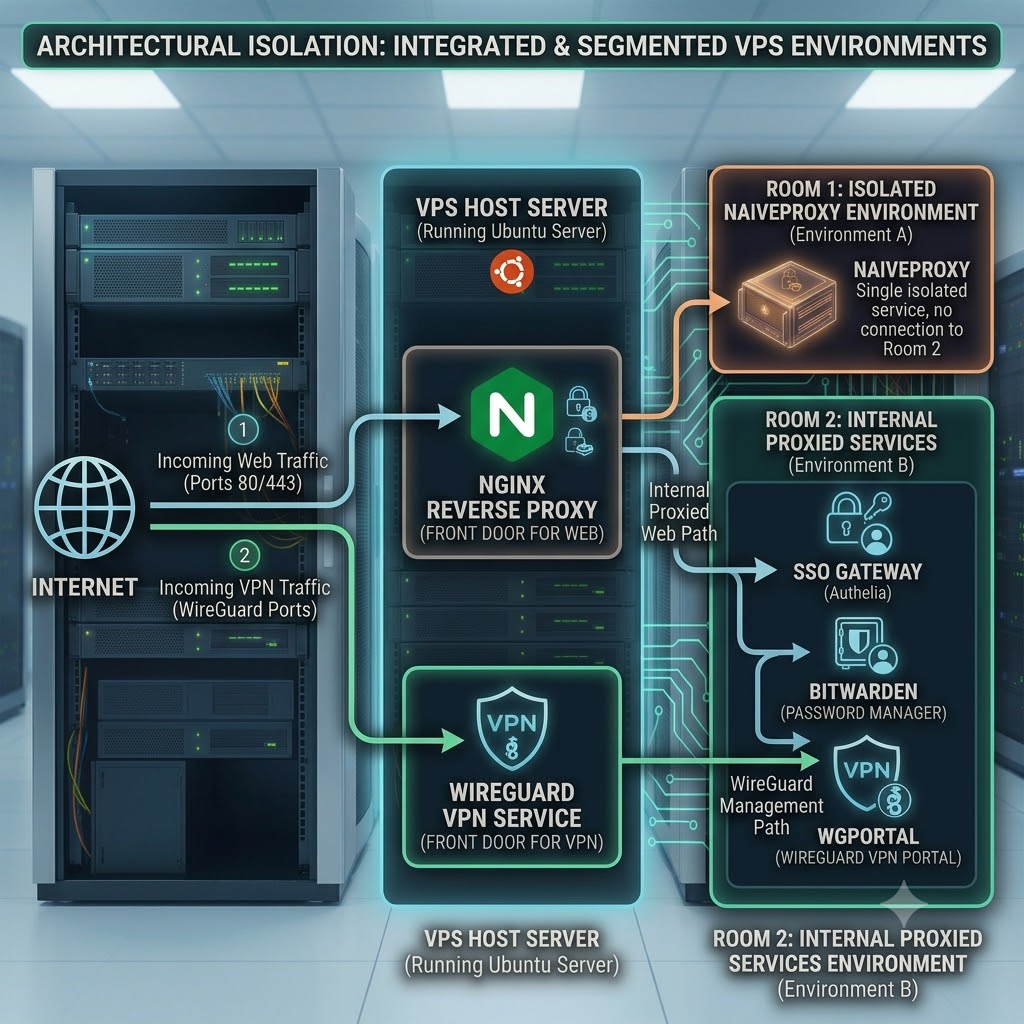
To integrate Cloudflare into advanced Nginx multiplexed architecture Cloudflare dashboard should be configured to accommodate two completely different traffic behaviors: standard web traffic (which can be proxied by Cloudflare) and your NaïveProxy traffic (which must bypass Cloudflare’s CDN proxying to maintain raw HTTP/2 streams).
DNS Record Configuration
| Subdomain | Type | Target IP | Proxy Status (Cloudflare Toggle) | Reason |
proxy.yourdomain.com | A | Server IP | DNS Only (Gray Cloud) | Critical: Cloudflare’s proxy network terminates HTTP/2 connections and does not allow the long-lived, raw HTTP/2 CONNECT tunnels required by NaïveProxy |
authelia.domain.com | A or AAAA | Server IP | Proxied (Orange Cloud) | Allowed. This enables Cloudflare DDoS protection, caching, and hides your origin server’s true IP for standard web traffic. |
nextcloud.domain.com | A or AAAA | Server IP | Proxied (Orange Cloud) | Allowed. Nginx restores the original visitor IP using the CF-Connecting-IP header. |
SSL/TLS Encryption Mode
In your Cloudflare Dashboard, navigate to SSL/TLS -> Overview.
- Required Setting: Full (Strict)
- Why this is mandatory: * If you choose Flexible, Cloudflare will talk to your Nginx server over unencrypted HTTP (Port 80). Because your Nginx virtual hosts are explicitly configured to listen with
sslon port4443, the connection will instantly break, or trigger an infinite 301 redirect loop.- Full (Strict) forces Cloudflare to validate the Let’s Encrypt certificates generated by your Nginx and Caddy setups, ensuring authentic end-to-end encryption.
Creating the Cloudflare API Token for Caddy
Because your custom Caddy container uses the DNS challenge (caddy-dns/cloudflare) to fetch certificates, it needs a scoped API token to modify your DNS zone temporarily during renewal. This avoids exposing your master global password.
Copy the generated token and paste it directly into your Caddyfile under the tls { dns cloudflare <TOKEN> } block.
Go to Cloudflare Profile -> API Tokens page.
Click Create Token -> Use the Edit zone DNS template.
Configure the permissions exactly as follows:
Permissions:Zone -> DNS -> EditZone -> Zone -> Read
Zone Resources:Include -> Specific zone -> yourdomain.com
The Challenge: Multiplexing VPN and Web Traffic
Running a DPI-resistant stealth VPN like NaïveProxy alongside standard web infrastructure (Nextcloud, Authelia, etc.) on a single IP address requires advanced Layer 4 routing. The gold standard is using Nginx Stream SNI multiplexing to pass traffic to a custom Caddy container.
However, administrators often encounter fatal connection crashes when combining these tools. If your curl tests or Naïve clients are throwing errors like:
curl: (35) error:0A000126:SSL routines::unexpected eof while readingdecode error (562)curl: (52) Empty reply from serverwrong version number
You are likely hitting a combination of Docker IPv6 blackholes, Caddy Host header mismatches, and Go HTTP/2 pipeline crashes caused by the PROXY protocol. Here is the complete architecture to fix it.
The Solution: Nginx Split-Stream Architecture
The root of the pipeline crash occurs when Nginx sends the PROXY TCP4 header to Caddy. Caddy’s Go-based HTTP/2 router often chokes on this wrapper, causing the tunnel to collapse instantly. However, standard web applications require this header to restore real client IPs via Cloudflare.
The fix is a Split-Stream Architecture. We instruct Nginx to send pure, raw TCP to the proxy, but use a hidden intermediary port to inject the proxy_protocol header strictly for your other web services.
Step 1: The Nginx Stream Configuration (nginx.conf)
At Layer 4, Nginx reads the SNI (Server Name Indication) before TLS decryption and routes the traffic accordingly.
Nginx
stream {
    # SNI Map: Route traffic based on the requested domain
    map $ssl_preread_server_name $backend_name {
        proxy.yourdomain.com  127.0.0.1:8443;   # Raw TCP to NaïveProxy (Caddy)
        default               127.0.0.1:9999;   # Web traffic to the PROXY interceptor
    }

    # The Main Public Ingress (Port 443)
    server {
        listen 443;
        listen [::]:443;
        ssl_preread on;
        proxy_pass $backend_name;
    }

    # The Hidden Interceptor (Injects PROXY header for standard sites)
    server {
        listen 127.0.0.1:9999;
        proxy_pass 127.0.0.1:4443;
        proxy_protocol on; # Injects the header for Layer 7 web apps
    }
}
Step 2: Layer 7 Web Services Configuration
For your standard web applications to stay online and log real client IPs, they must listen on the internal handoff port (4443) and explicitly trust the interceptor.
Nginx
server {
    # Listen on the handoff port and expect the proxy_protocol header
    listen 127.0.0.1:4443 ssl proxy_protocol;
    server_name domain.com;

    # Restore Real IPs via Cloudflare
    set_real_ip_from 127.0.0.1;

    # Add Cloudflare IP ranges here...
    real_ip_header CF-Connecting-IP;

    ...
}
Step 3: Compiling the Custom Caddy Docker Image
Standard Caddy lacks the necessary modules. You must compile it from source using a Dockerfile to include forwardproxy and the Cloudflare DNS challenge plugin.
Dockerfile
FROM caddy:builder AS builder
RUN xcaddy build \
    --with github.com/caddyserver/forwardproxy@caddy2=github.com/klzgrad/forwardproxy@naive \
    --with github.com/caddy-dns/cloudflare

FROM caddy:alpine
COPY --from=builder /usr/bin/caddy /usr/bin/caddy
Step 4: Fixing Docker IPv6 and Port Mismatches (docker-compose.yaml)
If Caddy successfully receives the proxy request but throws a 502 Bad Gateway (resulting in a 0-byte or EOF error on the client), it is likely trying to dial upstream destinations using IPv6 inside a Docker bridge network that doesn’t route it. We must disable IPv6 at the container kernel level.
YAML
services:
  naiveproxy:
    build: .
    restart: unless-stopped
    ports:
      - "127.0.0.1:8443:443" # Map the Nginx handoff to Caddy's internal 443
    sysctls:
      # Fixes the Go dialer blackhole by forcing IPv4
      - net.ipv6.conf.all.disable_ipv6=1
      - net.ipv6.conf.default.disable_ipv6=1
    volumes:
      - ./Caddyfile:/etc/caddy/Caddyfile:ro
      - ./data:/data
      - ./config:/config
Step 5: The Stealth Caddyfile
The final hurdle is the Host Header Mismatch. When the Naïve client requests a tunnel, it asks for the destination (e.g., CONNECT ifconfig.me:443). If your Caddyfile only listens for proxy.yourdomain.com, it will ignore the proxy request and return a decoy page, causing curl to throw a wrong version number error when it attempts the TLS handshake.
Adding the :443 catch-all fixes this.
Caddyfile
{
    debug
    order forward_proxy before reverse_proxy
}


# The :443 catch-all is mandatory for the forward_proxy to intercept CONNECT requests
:443, proxy.yourdomain.com {
    tls {
        dns cloudflare YOUR_CLOUDFLARE_API_TOKEN
    }

    route {
        forward_proxy {
            # Must be plaintext, NOT a bcrypt hash
            basic_auth your_username your_password
            hide_ip
            hide_via
            probe_resistance # Thwarts active DPI scanners
        }

        # Decoy Fallback
        file_server {
            root /usr/share/caddy
        }
    }
}
Conclusion
By splitting the Nginx TCP stream, disabling Docker’s internal IPv6 routing, and aligning the Caddy Host headers, you can successfully multiplex an enterprise-grade NaïveProxy tunnel on Port 443 alongside your standard web applications.